Rate Limiting
By Gaurav Nardia • 17.Mar.2026
I implemented rate limiting in Puffin analytics and it made me realize there’s more depth to it than I initially thought. Writing this to properly understand it for myself.
Since Puffin is an analytics tool, anyone can hit the tracking endpoint repeatedly. Without limits, one bad actor (or even a bug) could flood the system.
In Puffin, rate limiting means controlling how many events a single source(user/IP/project) can send in a given time.
In Puffin this is the events flow without rate limiting:
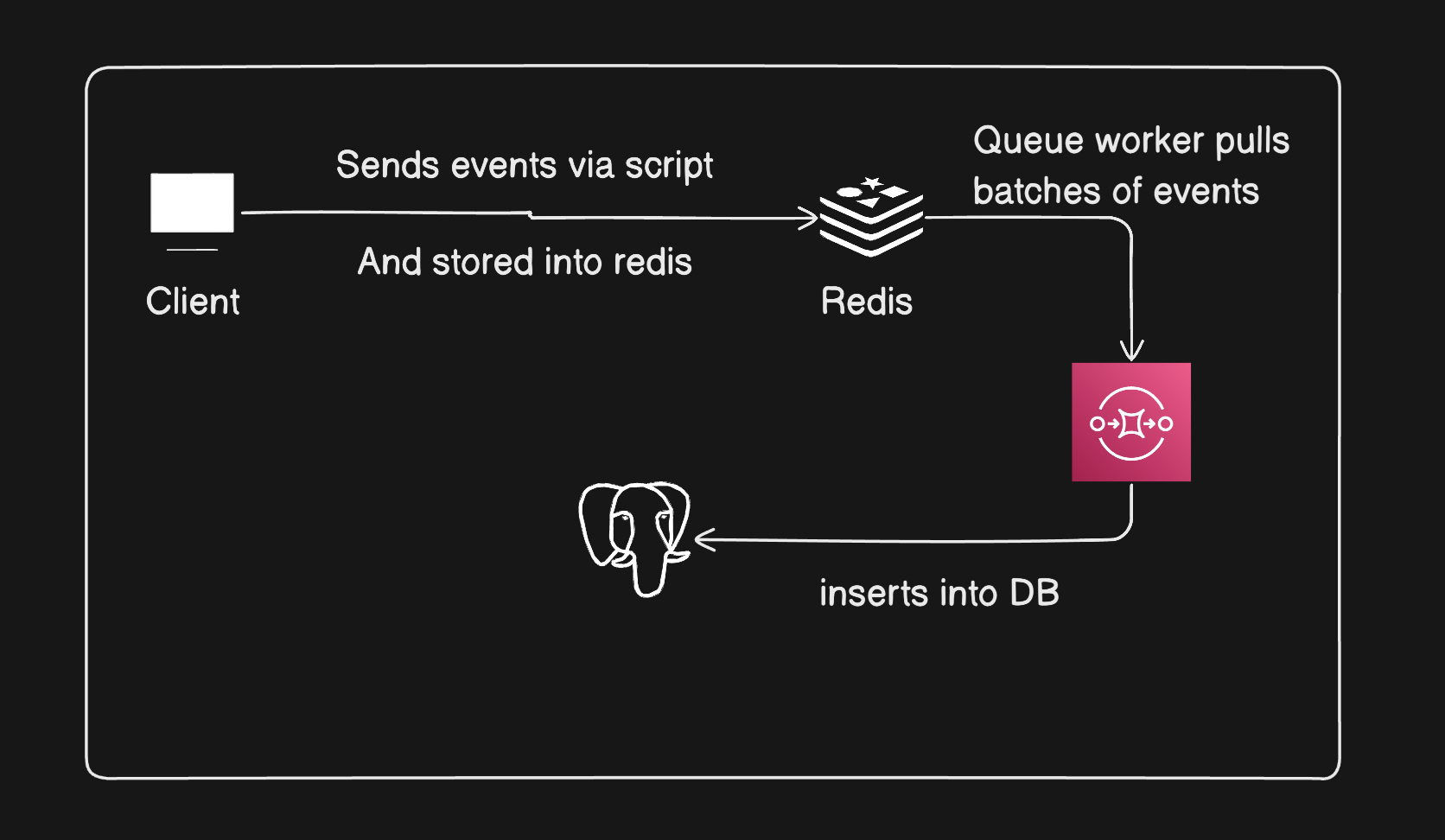
Without rate limiting redis can get flooded, Queue can lag, DB writes can spike, Overall system can become unstable. So I needed a way to control how fast request enter the system.
So what rate limiting means is putting a cap on how many requests a user (or client) can make in a given time. If they cross the limit, we simply reject the request.
I think of it like a bucket with tokens. Each user has a bucket with fixed token and token are added over time. Every request consumes one token. If there is no token left in the bucket, request is rejected.
How to implement rate limiting in Puffin is I rate limit on the basis of user IP and Used Redis to store count. I used Fixed Window Counter approach in Puffin.
How it works is it tracks every request from the IP. When the first event hits, it sets the expiry in Redis of 60 seconds, and let's say I allowed 100 requests per second. If the IP exceeds the 300 requests per 60 second, it blocks the request. And after every 60 seconds, the request resets.
After implementing the rate limiting in Puffin, I read more about it. I read about the different types of rate limiting.
Types of Rate Limiting
- Fixed Window Counter
- Token Bucket
- Sliding Window Log
- Leaky Bucket
- Sliding Window Counter
Fixed Window Counter
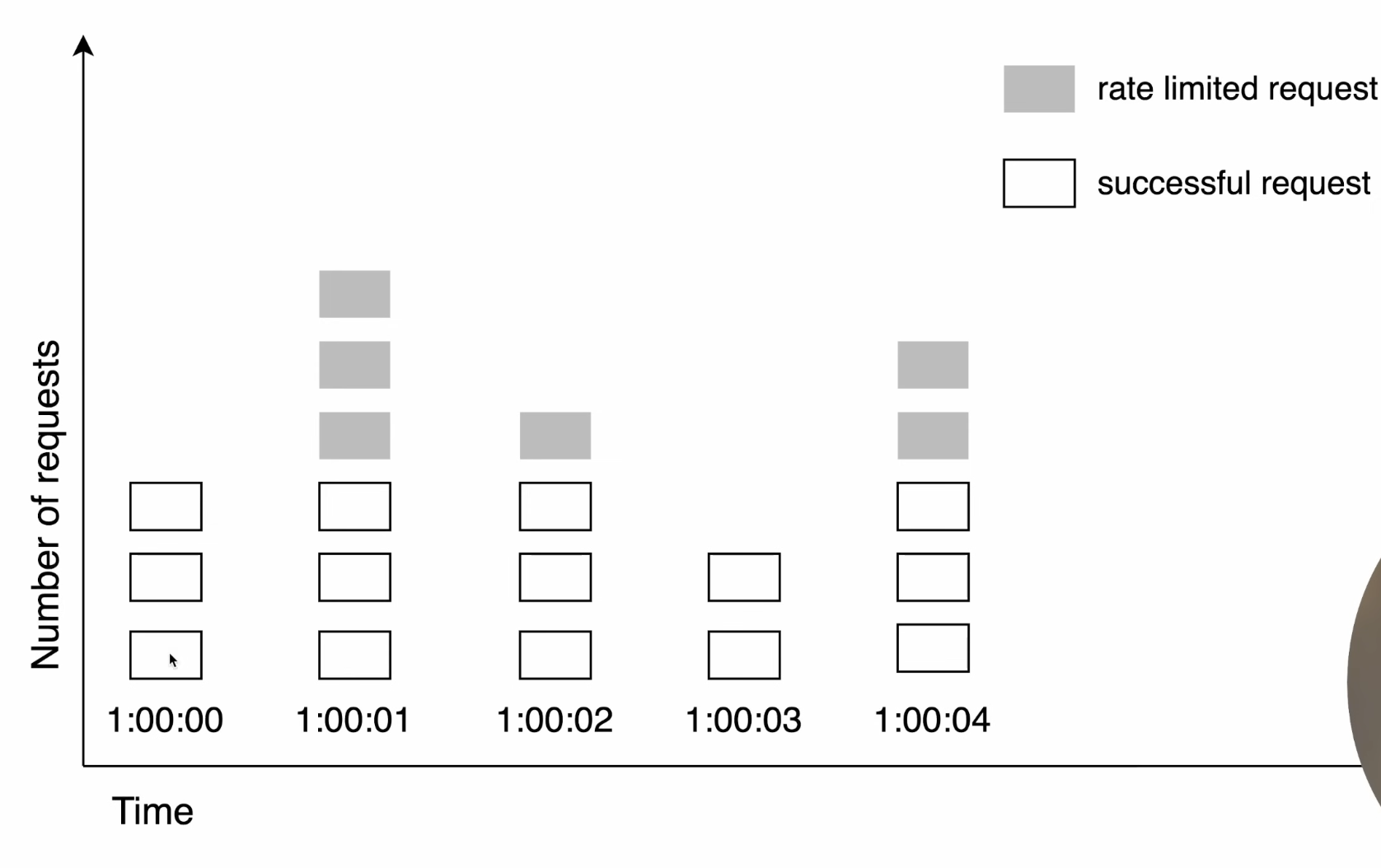
In this, we count how many requests a user makes within a fixed time window (like 1 minute). For example, if the limit is 100 requests per minute, we allow requests until the counter reaches 100.
Once the limit is reached, any extra requests within that same window are rejected. When the time window resets, the counter also resets back to 0, and requests are allowed again.
The main issue is that it allows bursts at the boundary. For example, a user can send 100 requests at the end of one window and another 100 at the start of the next window, which can cause sudden spikes.
Token Bucket
Token bucket is basically a bucket with a fixed number of tokens that refill at a fixed rate of time.
 It's so simple to implement and memory efficient but bucket size and refill rate can be challenging to tune properly.
Sliding Window Log
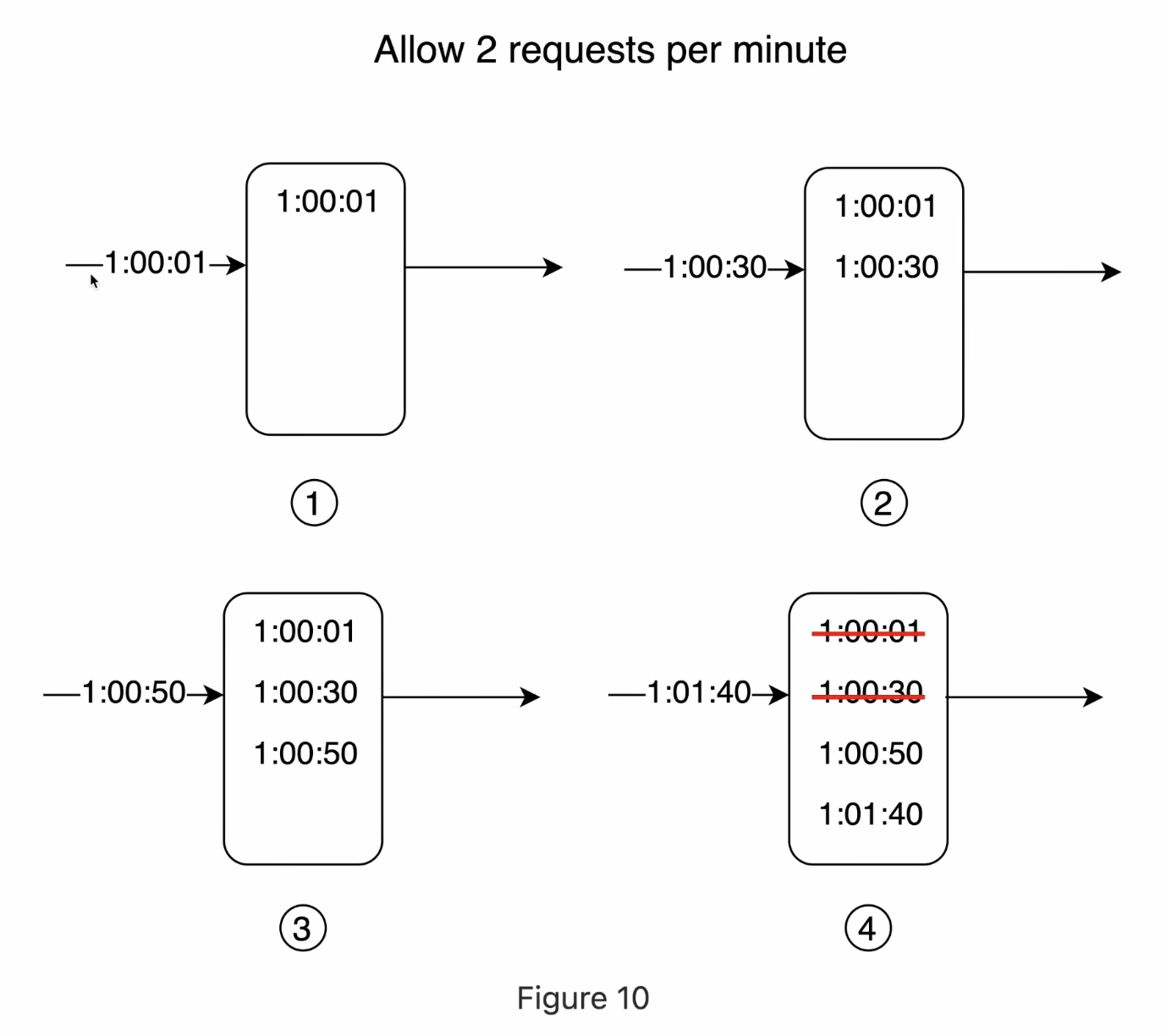
Sliding window log works by storing each request with its timestamp. In this, every time a request comes in, we save its timestamp. Then, for each new request, we check how many requests were made in the last fixed duration (like the last 60 seconds).
We remove all the old requests that are outside this time window and only keep the recent ones. If the number of remaining requests is within the limit, we allow the request; otherwise, we reject it.
This way, the limit is always based on the actual last 60 seconds, not fixed time blocks, so it avoids burst issues. The downside is that it needs more memory because we have to store every request.
Leaky Bucket
Leaky bucket works on queue-based system. Requests are added into a bucket that has a fixed capacity. For example, if the bucket size is 10,000 requests, any new requests beyond that limit will overflow and get rejected. Requests don’t get processed immediately. Instead, they leave the bucket at a constant, fixed rate, like water leaking out.
These requests then move forward and are processed steadily at that same rate. This way, even if a sudden burst of requests comes in, the system handles them smoothly without spikes.
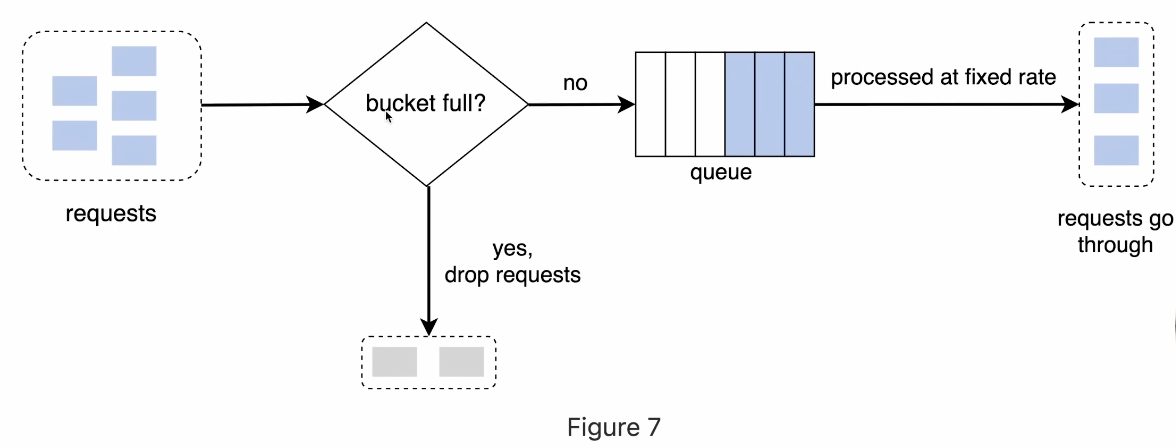
The pros of this are:
- its memory efficiency
- requests are processed at a fixed rate so it's suitable for use cases where the stable rate flow is needed.
The pros of this are:
- Burst of traffic fills up the queue with old requests, and new requests will not proceed.
- There are two parameters in this It might not be easy to tune it up properly.
Sliding Window Counter
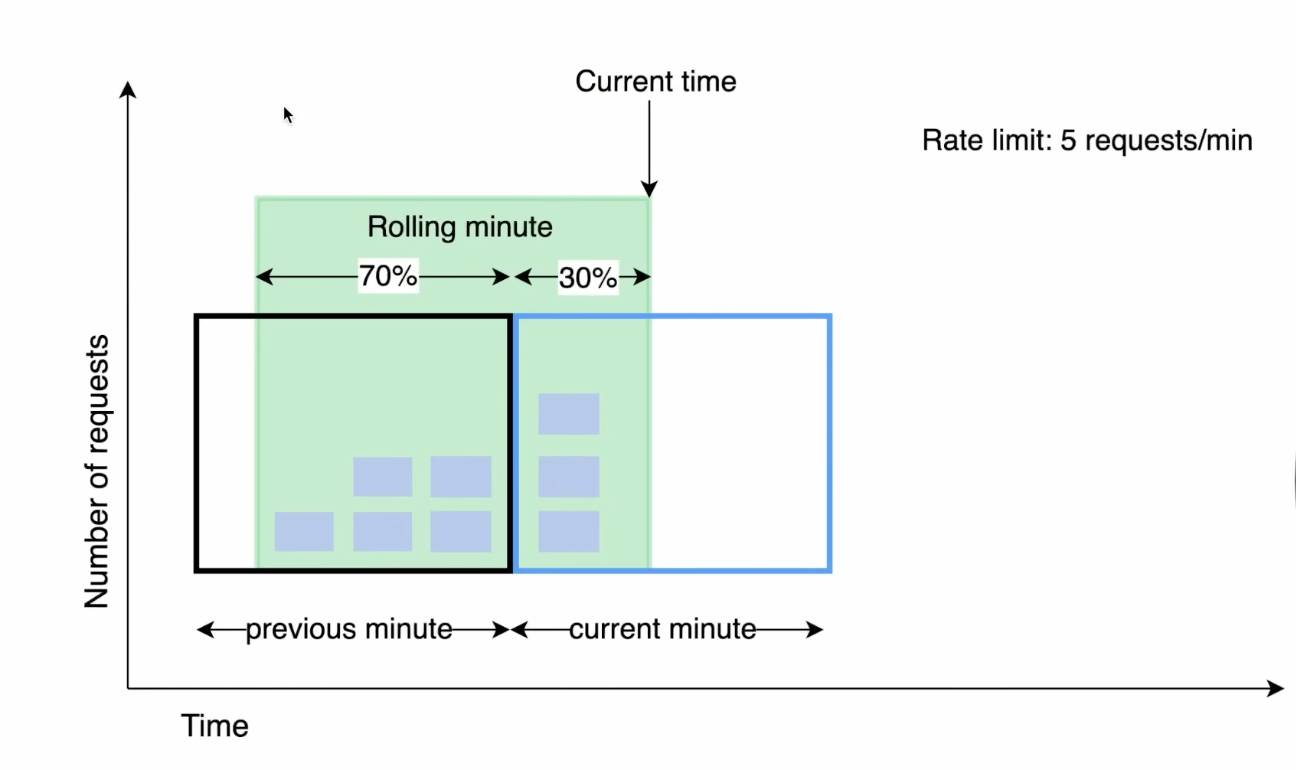
Sliding window counter works by combining the current window and the previous window. In this, we don’t store every request like sliding window log. Instead, we just keep the count of requests in the current window and the previous one.
When a new request comes in, we calculate an approximate count by taking some part of the previous window’s requests (based on how much time has passed) and adding the current window’s requests. So instead of resetting everything like fixed window, the count changes smoothly over time.
This helps reduce the burst issue at the boundaries and gives a more balanced limit. It’s more accurate than fixed window and also doesn’t use too much memory.