OAuth & PKCE
By Gaurav Nardia • 10.Apr.2026
In this article, I will write about OAuth and PKCE. What are these, and how these works? We will talk about them in detail.
OAuth basically is your application can use the third-party identity provider to log in. For example, we have seen on a lot of websites a button called "Sign in with Google", "Sign in with Microsoft", "Sign in with Apple" etc. These buttons are the protocols of OAuth.
But now you will think, why we need OAuth when we can use just email and password. The problem is that for email & password, we have to remember our email and password every time when we log in into apps with different IDs, And for email and password, we have to write the whole authentication system from scratch, and we have to handle a lot of security features.
But by Oauth, we don't need to remember our multiple passwords, and we don't have to worry about the security. Let's say, if we are doing sign in with Google, Google will handle it with security itself. You don't need to worry about the security. That's where OAuth comes into the picture. You just click the "Sign in with Google" button and you can just log in.
Now, how does the OAuth flow work? Let's say we are doing sign in with Google.
- Go to Google Console.
- Register your app.
- You will get client ID and secret after your app registration.
- Now integrate "sign in with Google" in your app by client ID and secret.
Now let's talk about the flow when a user clicks the "Sign in with Google" button. It redirects to the accounts.google.com consent popup, appended with the client ID and redirect URI. When the user clicks the "Approve" button on the Google popup, it redirects back to the app with the code, which is a temporary, short-lived code. That short-lived code interacts with Google's backend. Our app's backend sends the code, Google Client ID, and secret together to Google's backend. Google backend verifies it, and if it's successful, it gives you an access token. You store it on your server and can access the user's information.
You can see it in the diagram.
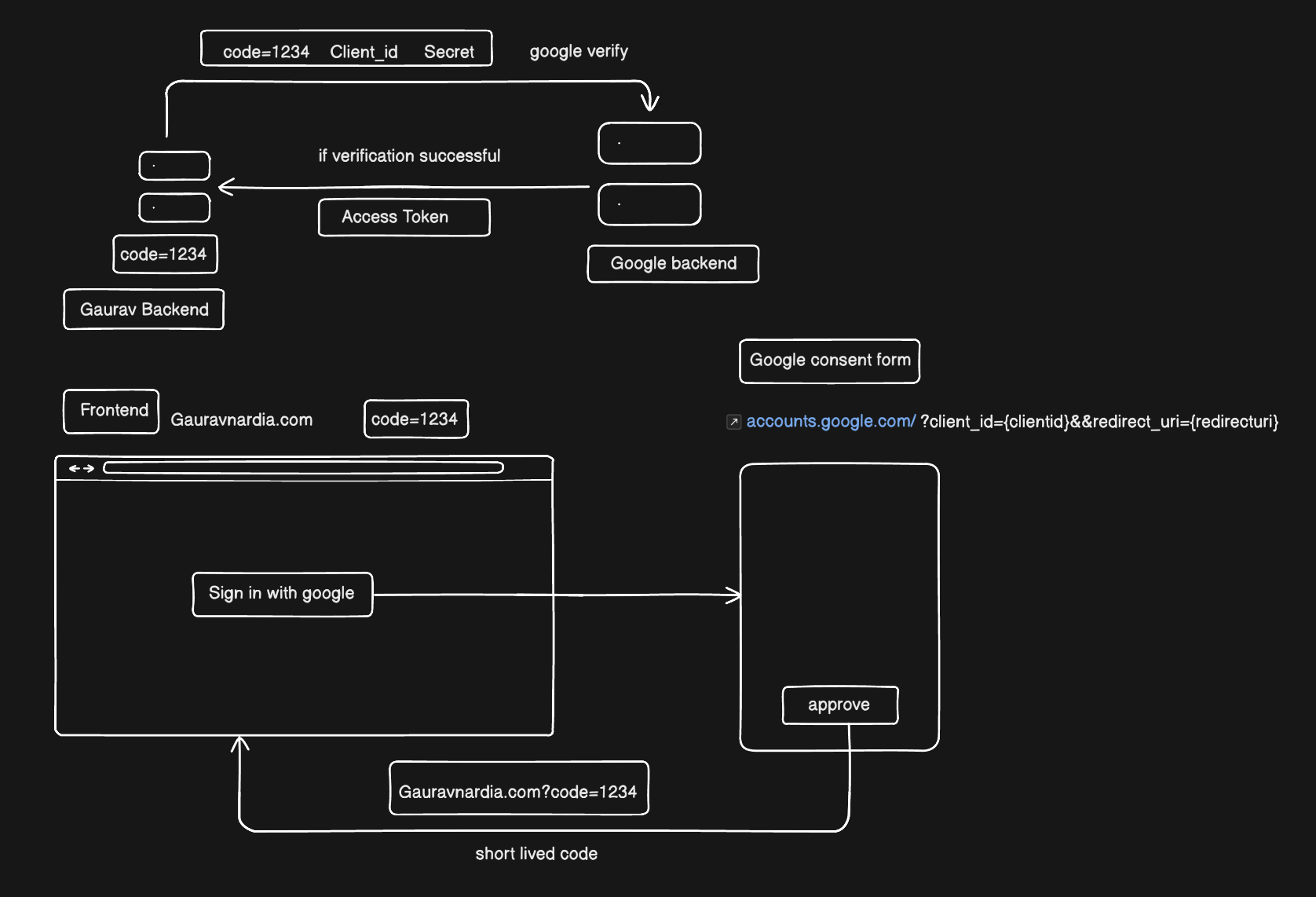
The problem happens with the client secret. We have to secure that because anyone can attack it and access our information. In this scenario, in the website application, the access token is stored on our server, so it is secured right now.
But when the app doesn't have a backend and it just has Google login, it is necessary to secure the client secret. What is the flow here? When our application doesn't have the backend:
- When we click the Google button, it redirects to the consent form with the client ID and redirect URI and sends back the code.
- If our application doesn't have the backend, we will store it in the client, but anyone can attack our client and get this code.
This is the exact problem that PKCE (proof key for code exchange) solves.
In PKCE, when the user clicks the "Sign in with Google" button, it generates a new random code every time. The random code will be different for every click, and it encrypts it and makes it a code challenge. Let's say we encrypt it via SHAA256. It generates two codes: Original code and code challenge.
It redirects to a consent popup with the appended client ID, code challenge, and encryption algorithm. And when a user clicks the Approve button on the consent screen, then Google backend stores the code challenge, encryption algorithm, and original code. And give the client a code.
Now, the client sends a request to the Google backend with the original code and the code that Google gave the client after clicking the Approve button. The Google backend decrypts the encrypted code that is stored in their backend, and if it matches the original code, it gives the access token.
That's how PKCE works, and that's how your client application is secured by PKCE(Proof key for code exchange ).